TL;DR
Every AI team I have worked with eventually builds the same thing: a fragile web of Python scripts, cron jobs, and Slack bots that duct-tape their ML models to the rest of the business. At Giisty, we had a content pipeline that involved calling an LLM for summarization, hitting a vector database for retrieval, running a classification model, and posting results to a CMS. The "orchestration layer" was a 2,000-line Python script that one engineer understood and everyone was afraid to touch.
The Problem With Glue Code
Every AI team I have worked with eventually builds the same thing: a fragile web of Python scripts, cron jobs, and Slack bots that duct-tape their ML models to the rest of the business. At Giisty, we had a content pipeline that involved calling an LLM for summarization, hitting a vector database for retrieval, running a classification model, and posting results to a CMS. The "orchestration layer" was a 2,000-line Python script that one engineer understood and everyone was afraid to touch.
When that engineer went on vacation and the pipeline broke, it took us three days to debug. That was the moment I decided we needed a proper workflow orchestration layer — something visual, maintainable, and accessible to the broader team. We landed on n8n for workflow orchestration, MCP (Model Context Protocol) for connecting AI models to external tools, and Claude Code for the intelligent processing nodes. This combination has fundamentally changed how we build and maintain AI pipelines.
Why n8n Over Airflow or Prefect
I have used Airflow extensively for ML pipeline orchestration, and it works well for batch processing workloads with well-defined DAGs. But n8n occupies a different niche. It is a visual workflow automation platform that excels at event-driven, real-time pipelines that integrate with dozens of external services out of the box.
The deciding factors for us were:
- Visual workflow builder that non-engineers on the team could inspect and understand
- Built-in integrations with Slack, Google Sheets, Notion, webhooks, and HTTP APIs — eliminating boilerplate connector code
- Self-hosted deployment on our own Kubernetes cluster, so sensitive data never leaves our infrastructure
- Webhook triggers that let us build event-driven pipelines instead of polling-based ones
We deployed n8n on our existing Kubernetes infrastructure using the official Helm chart, backed by PostgreSQL for workflow state and Redis for queue management.
A Real n8n Workflow: Content Processing Pipeline
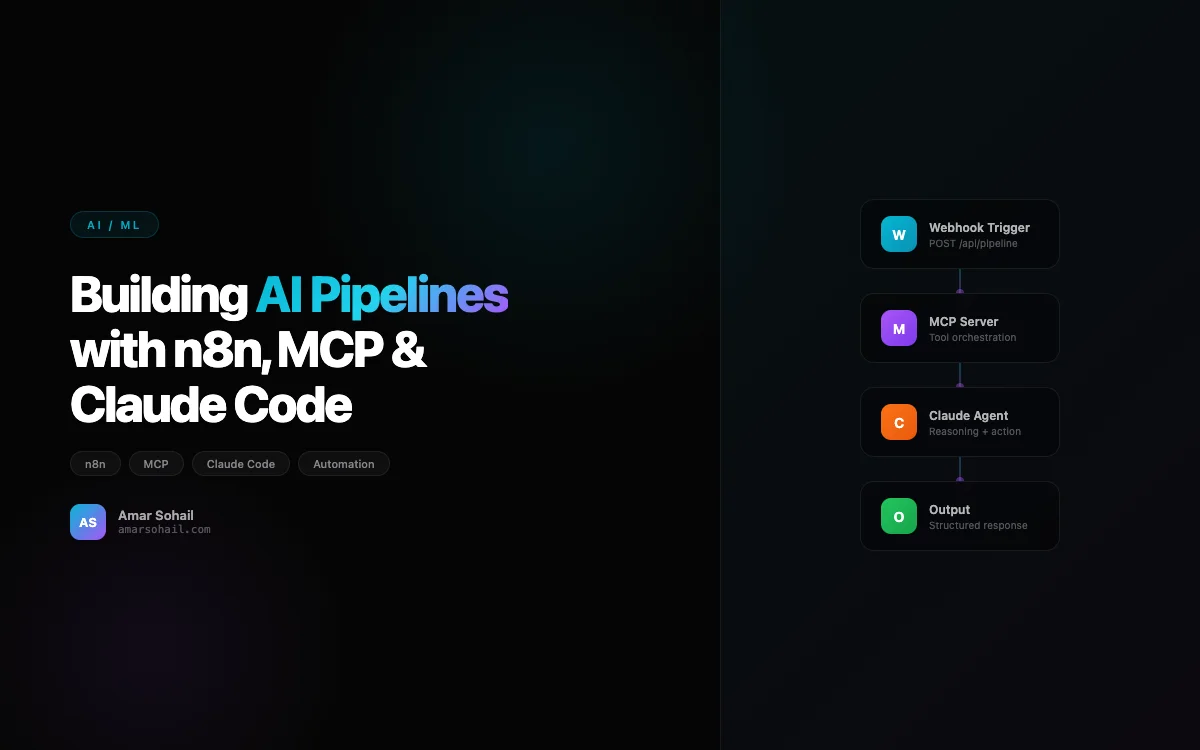
Here is the structure of our content processing pipeline. When a new article arrives via webhook, n8n orchestrates the entire processing chain:
# n8n HTTP Request node calls our FastAPI service
# This is the classification endpoint that n8n hits

from fastapi import FastAPI, HTTPException
from pydantic import BaseModel
from anthropic import Anthropic

app = FastAPI()
client = Anthropic()

class ContentPayload(BaseModel):
    content_id: str
    raw_text: str
    source: str
    metadata: dict

class ProcessedContent(BaseModel):
    content_id: str
    summary: str
    category: str
    keywords: list[str]
    sentiment: float
    embedding_stored: bool

@app.post("/process", response_model=ProcessedContent)
async def process_content(payload: ContentPayload):
    # Step 1: Classify and summarize with Claude
    response = client.messages.create(
        model="claude-sonnet-4-20250514",
        max_tokens=1024,
        messages=[{
            "role": "user",
            "content": f"""Analyze this content and return JSON with:
            - summary (2-3 sentences)
            - category (one of: tech, business, science, culture)
            - keywords (list of 5-8 terms)
            - sentiment (float from -1.0 to 1.0)

            Content: {payload.raw_text[:4000]}"""
        }]
    )

    analysis = parse_json_response(response.content[0].text)

    # Step 2: Generate and store embedding
    embedding = generate_embedding(payload.raw_text)
    store_in_pinecone(
        id=payload.content_id,
        embedding=embedding,
        metadata={**analysis, **payload.metadata}
    )

    return ProcessedContent(
        content_id=payload.content_id,
        summary=analysis["summary"],
        category=analysis["category"],
        keywords=analysis["keywords"],
        sentiment=analysis["sentiment"],
        embedding_stored=True
    )
The n8n workflow connects this endpoint to upstream triggers and downstream actions: Slack notifications on failure, Google Sheets logging for the content team, and a conditional branch that routes high-priority content to a human review queue.
MCP: The Missing Piece for Tool Integration
Model Context Protocol was the piece I did not know I was missing. Before MCP, every time we wanted an LLM to interact with an external system — a database, an API, a file system — we wrote custom tool definitions, serialization logic, and error handling. For each new model provider, we wrote it again. MCP standardizes this.
MCP defines a protocol for connecting AI models to external tools and data sources. Think of it like USB for AI — a universal interface that works regardless of which model or which tool you are connecting.
Here is how we built an MCP server that gives Claude access to our internal knowledge base:
from mcp.server import Server
from mcp.types import Tool, TextContent
import json
from pinecone import Pinecone

server = Server("knowledge-base")

pc = Pinecone(api_key="your-api-key")
index = pc.Index("internal-docs")

@server.tool()
async def search_knowledge_base(
    query: str,
    top_k: int = 5,
    namespace: str = "default"
) -> str:
    """Search the internal knowledge base for relevant documents.

    Args:
        query: The search query in natural language
        top_k: Number of results to return (default 5)
        namespace: Knowledge base namespace to search
    """
    query_embedding = generate_embedding(query)

    results = index.query(
        vector=query_embedding,
        top_k=top_k,
        namespace=namespace,
        include_metadata=True
    )

    documents = []
    for match in results.matches:
        documents.append({
            "title": match.metadata.get("title", "Untitled"),
            "content": match.metadata.get("content", ""),
            "source": match.metadata.get("source", "unknown"),
            "score": match.score
        })

    return json.dumps(documents, indent=2)

@server.tool()
async def get_customer_context(customer_id: str) -> str:
    """Retrieve customer context including history and preferences.

    Args:
        customer_id: The unique customer identifier
    """
    # Fetch from our customer data service
    customer = await fetch_customer_data(customer_id)

    return json.dumps({
        "name": customer.name,
        "tier": customer.tier,
        "recent_interactions": customer.recent_interactions[-5:],
        "preferences": customer.preferences,
        "open_tickets": customer.open_tickets
    }, indent=2)

@server.tool()
async def create_support_ticket(
    customer_id: str,
    title: str,
    description: str,
    priority: str = "medium"
) -> str:
    """Create a new support ticket in the ticketing system.

    Args:
        customer_id: Customer ID to associate the ticket with
        title: Brief title for the ticket
        description: Detailed description of the issue
        priority: Ticket priority - low, medium, high, urgent
    """
    ticket = await ticketing_service.create(
        customer_id=customer_id,
        title=title,
        description=description,
        priority=priority
    )

    return json.dumps({
        "ticket_id": ticket.id,
        "status": "created",
        "url": f"https://tickets.internal/view/{ticket.id}"
    })
The power of MCP is that once you define these tools, any MCP-compatible client can use them. Claude Desktop, Claude Code, or any custom agent you build — they all discover and invoke these tools through the same protocol. We went from maintaining six different tool integration layers to one MCP server that everything connects to.
Claude Code: The Intelligent Glue
Claude Code is where the actual intelligence lives in our pipelines. We use it not just for text generation, but as an autonomous coding agent that can inspect codebases, run tests, fix bugs, and generate entire modules based on specifications.
The workflow that changed our development velocity the most is automated PR review and code generation. When a new feature request comes through our project management system, an n8n workflow triggers Claude Code with the specification, relevant code context from our MCP server, and coding guidelines from our internal docs.
What makes this different from just calling an LLM API is that Claude Code has persistent context about our codebase. It understands our patterns, our test conventions, and our architectural decisions. Combined with MCP tools that give it access to our documentation and previous PR history, it generates code that actually follows our team's conventions rather than generic best practices.
Connecting the Pieces: n8n + MCP + Claude Code
Here is how the three pieces fit together in our most impactful pipeline — automated customer insight generation:
# This runs as an n8n Code node that orchestrates the full pipeline

import httpx
import json

async def generate_customer_insights(customer_id: str):
    """
    Pipeline orchestrated by n8n:
    1. Webhook trigger (customer milestone event)
    2. MCP tool: fetch customer context
    3. MCP tool: search knowledge base for similar customers
    4. Claude: generate personalized insights
    5. n8n: route to account manager via Slack
    6. n8n: log to analytics dashboard
    """

    # n8n passes these from the MCP tool responses
    customer_context = await mcp_client.call_tool(
        "get_customer_context",
        {"customer_id": customer_id}
    )

    similar_cases = await mcp_client.call_tool(
        "search_knowledge_base",
        {
            "query": f"customer success patterns for "
                     f"{customer_context['tier']} tier",
            "top_k": 3,
            "namespace": "customer-success"
        }
    )

    # Claude generates the insight with full context
    insight = await claude_client.messages.create(
        model="claude-sonnet-4-20250514",
        max_tokens=2048,
        system="You are an AI customer success analyst. Generate "
               "actionable insights based on customer data and "
               "historical patterns. Be specific and data-driven.",
        messages=[{
            "role": "user",
            "content": f"""Generate a customer health report:

            Customer Context:
            {json.dumps(customer_context, indent=2)}

            Similar Customer Patterns:
            {json.dumps(similar_cases, indent=2)}

            Include: churn risk assessment, upsell opportunities,
            and recommended next actions for the account manager."""
        }]
    )

    return {
        "customer_id": customer_id,
        "insight": insight.content[0].text,
        "generated_at": datetime.utcnow().isoformat()
    }
The n8n workflow handles the event triggering, error handling, retries, and downstream routing. MCP provides the tool layer. Claude provides the intelligence. Each piece does what it is best at.
Lessons From Six Months in Production
n8n's error handling needs reinforcement. The built-in retry logic works for simple failures, but for AI pipelines where an LLM might return malformed JSON or hit rate limits, we added a custom error handler node that categorizes failures and routes them appropriately — retryable errors go back to the queue, prompt failures go to a human review channel.
MCP server versioning matters early. We broke three downstream pipelines when we renamed a tool parameter. Now every MCP tool has a version suffix, and we run old and new versions in parallel during migration windows.
Cost tracking is a first-class concern. With multiple pipelines calling Claude dozens of times per hour, costs compound fast. We built a middleware layer that tracks token usage per pipeline, per customer, and per n8n workflow. This feeds into our FinOps dashboard and lets us set per-pipeline budget alerts. I discuss this more in my post on RAG pipeline architecture, where cost management is equally critical.
Start with n8n for orchestration, not Python scripts. Every AI pipeline we built with n8n has survived the "original engineer left" test. The visual workflow is self-documenting in a way that Python orchestration code never is. New team members can trace a pipeline's logic in minutes instead of hours.
The combination of n8n, MCP, and Claude Code has become our default stack for AI automation. It is not the right choice for every workload — high-throughput batch processing still belongs in Airflow, and latency-sensitive inference still needs custom serving infrastructure. But for the 80% of AI pipelines that are really about connecting intelligence to business systems, this stack is remarkably productive. If you are building multi-agent systems, this same infrastructure serves as the connective tissue between your agents and the real world.